Input / Output
qim3d.io.Downloader
Provides access to the QIM online data repository and manages file downloads.
This utility allows users to easily fetch, download, and load sample datasets for testing, benchmarking, or educational purposes. It automatically handles local caching to avoid repeated downloads of the same file.
The Downloader acts as an interface to the QIM data repository,
organizing files into accessible attributes (e.g., downloader.Cowry_Shell.Cowry_DOWNSAMPLED). It also
serves as a general-purpose tool to retrieve files from any given URL via the __call__ method.
Attributes:
| Name | Type | Description |
|---|---|---|
folder_name |
str or PathLike
|
Dynamic attributes corresponding to folders in the repository (e.g., |
Methods:
| Name | Description |
|---|---|
list_files |
Displays a catalog of downloadable files available in the repository. |
__call__ |
Downloads a file from a specific URL. |
Syntax for downloading and loading a pre-defined file:
qim3d.io.Downloader().{folder_name}.{file_name}(load_file=True)
Overview of available data
Below is a table of the available folders and files on the QIM data repository.
| Folder name | File name | File size |
|---|---|---|
Coal |
CoalBrikett CoalBrikett_Zoom CoalBrikettZoom_DOWNSAMPLED |
2.23 GB 3.72 GB 238 MB |
Corals |
Coral_1 Coral_2 Coral2_DOWNSAMPLED MexCoral |
2.26 GB 2.38 GB 162 MB 2.23 GB |
Cowry_Shell |
Cowry_Shell Cowry_DOWNSAMPLED |
1.82 GB 116 MB |
Crab |
HerrmitCrab OkinawaCrab |
2.38 GB 1.86 GB |
Deer_Mandible |
Animal_Mandible DeerMandible_DOWNSAMPLED |
2.79 GB 638 MB |
Foam |
Foam Foam_DOWNSAMPLED Foam_2 Foam_2_zoom |
3.72 GB 238 MB 3.72 GB 3.72 GB |
Hourglass |
Hourglass Hourglass_4X_80kV_Air_9s_1_97um Hourglass_longexp_rerun |
3.72 GB 1.83 GB 3.72 GB |
Kiwi |
Kiwi |
2.86 GB |
Loofah |
Loofah Loofah_DOWNSAMPLED |
2.23 GB 143 MB |
Marine_Gastropods |
MarineGatropod_1 MarineGastropod1_DOWNSAMPLED MarineGatropod_2 MarineGastropod2_DOWNSAMPLED |
2.23 GB 143 MB 2.60 GB 166 MB |
Mussel |
ClosedMussel1 ClosedMussel1_DOWNSAMPLED |
2.23 GB 143 MB |
Oak_Branch |
Oak_branch OakBranch_DOWNSAMPLED |
2.38 GB 152 MB |
Okinawa_Forams |
Okinawa_Foram_1 Okinawa_Foram_2 |
1.84 GB 1.84 GB |
Physalis |
Physalis Physalis_DOWNSAMPLED |
3.72 GB 238 MB |
Raspberry |
Raspberry2 Raspberry2_DOWNSAMPLED |
2.97 GB 190 MB |
Rope |
FibreRope1 FibreRope1_DOWNSAMPLED |
1.82 GB 686 MB |
Sea_Urchin |
SeaUrchin Cordatum_Shell Cordatum_Spine |
2.60 GB 1.85 GB 183 MB |
Snail |
Escargot |
2.60 GB |
Sponge |
Sponge |
1.11 GB |
Example
import qim3d

downloader = qim3d.io.Downloader()

# Browse available files
downloader.list_files()

# Download and load a specific sample
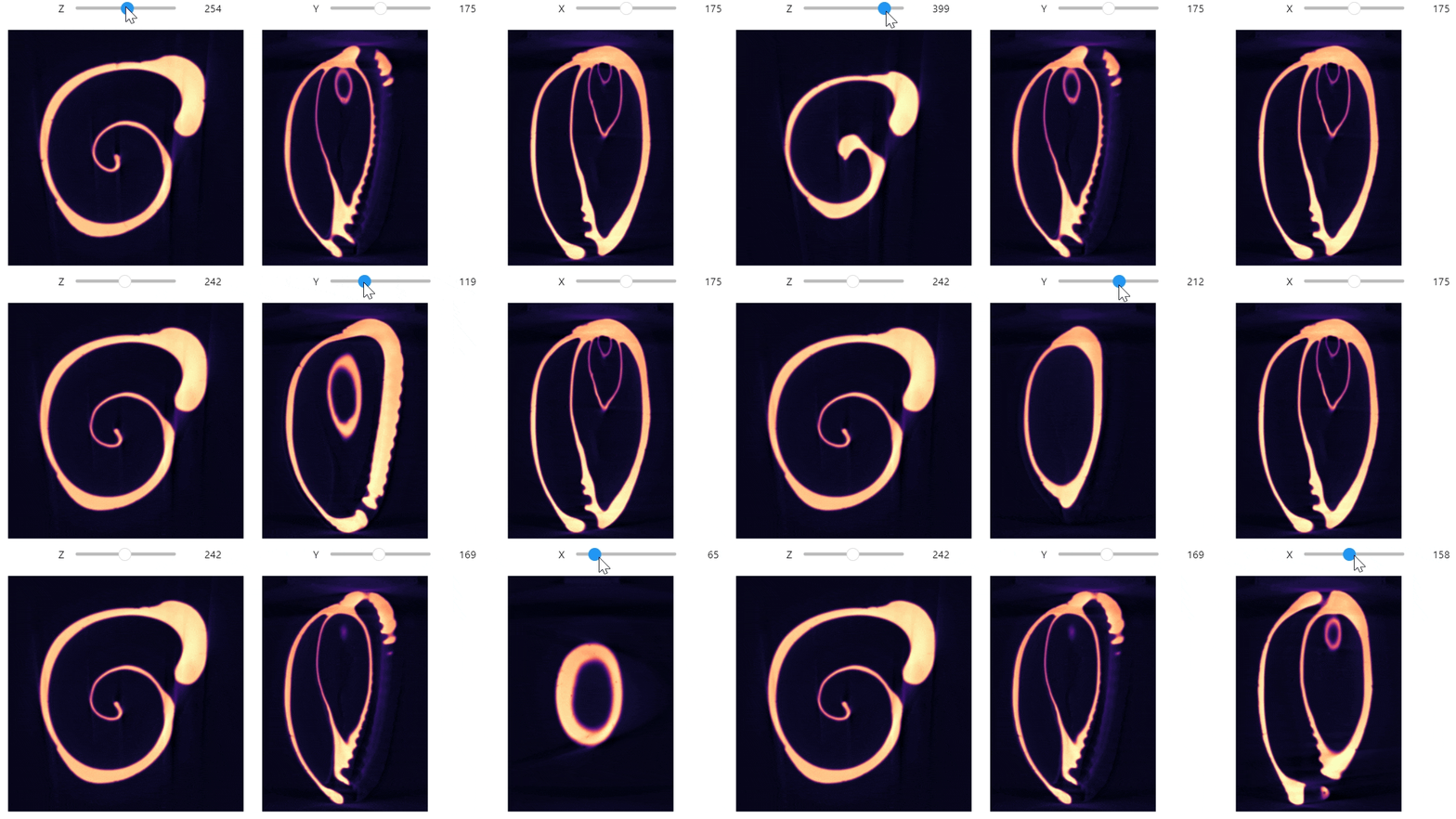
data = downloader.Cowry_Shell.Cowry_DOWNSAMPLED(load_file=True)

qim3d.viz.slicer_orthogonal(data, colormap="magma")
Source code in qim3d/io/_downloader.py
90 91 92 93 94 95 96 97 98 99 100 101 102 103 104 105 106 107 108 109 110 111 112 113 114 115 116 117 118 119 120 121 122 123 124 125 126 127 128 129 130 131 132 133 134 135 136 137 138 139 140 141 142 143 144 145 146 147 148 149 150 151 152 153 154 155 156 157 158 159 160 161 162 163 164 165 166 167 168 169 170 171 172 173 174 175 176 177 178 179 180 181 182 183 184 185 186 187 188 189 190 191 192 193 194 195 196 197 198 199 200 201 202 203 204 205 206 207 208 209 210 211 212 213 214 215 216 217 218 219 220 221 222 223 224 225 226 227 228 229 230 231 232 233 234 235 236 237 238 239 240 241 242 243 244 245 246 247 248 249 250 251 252 253 254 255 256 257 258 259 260 261 262 263 264 265 266 267 268 269 270 271 272 273 274 275 276 277 278 279 280 281 282 283 284 285 286 287 288 289 290 291 292 293 294 295 296 297 298 299 300 301 302 303 304 305 306 307 308 309 310 311 312 313 314 315 | |
qim3d.io.Downloader.__call__
Downloads a file or dataset from a direct URL.
This function serves as a general-purpose file retriever, capable of fetching data from external resources or cloud storage. It supports standard image formats (TIFF, HDF5, NIfTI, DICOM) as well as modern chunked formats (Zarr, OME-Zarr).
For large 3D volumes that may exceed available RAM, this function supports lazy loading
via the virtual_stack parameter. This allows users to work with metadata and open the
file without immediately reading the full pixel data into memory.
Parameters:
| Name | Type | Description | Default |
|---|---|---|---|
url
|
str
|
The direct URL of the file to download. Supported formats include: regular files (TIFF, HDF5, TXRM/TXM/XRM, NIfTI, PIL, VOL/VGI, DICOM) and Zarr/OME-Zarr stores. |
required |
output_dir
|
str
|
The local directory where the file will be saved. Defaults to the current working directory. |
'.'
|
load_file
|
bool
|
If |
False
|
virtual_stack
|
bool
|
If |
True
|
scale
|
int
|
Used only for Zarr/OME-Zarr stores when |
0
|
Returns:
| Name | Type | Description |
|---|---|---|
object |
object
|
The downloaded data or file path. The specific return type depends on the parameters:
|
Example
import qim3d

downloader = qim3d.io.Downloader()

# 1. Download a file from a URL without loading it
path = downloader(
    url="[https://archive.compute.dtu.dk/.../Cowry_DOWNSAMPLED.tif](https://archive.compute.dtu.dk/.../Cowry_DOWNSAMPLED.tif)",
    output_dir=".",
    load_file=False
)

# 2. Download and load directly into memory (Numpy array)
data = downloader(
    url="[https://archive.compute.dtu.dk/.../Cowry_DOWNSAMPLED.tif](https://archive.compute.dtu.dk/.../Cowry_DOWNSAMPLED.tif)",
    load_file=True,
    virtual_stack=False
)
Source code in qim3d/io/_downloader.py
159 160 161 162 163 164 165 166 167 168 169 170 171 172 173 174 175 176 177 178 179 180 181 182 183 184 185 186 187 188 189 190 191 192 193 194 195 196 197 198 199 200 201 202 203 204 205 206 207 208 209 210 211 212 213 214 215 216 217 218 219 220 221 222 223 224 225 226 227 228 229 230 231 232 233 234 235 236 237 238 239 240 241 242 243 244 245 246 247 248 249 250 251 252 253 254 255 256 257 258 259 260 261 262 263 264 265 266 267 268 269 270 271 272 273 274 275 276 277 278 279 280 281 282 283 284 285 | |
qim3d.io.Downloader.list_files
Displays a catalog of all available datasets in the QIM repository.
This method prints a formatted list of folder names, file names, and file sizes to the console log. It is useful for exploring the inventory of biological and material science scans available for download without needing to visit the website.
The output groups files by their parent folder (e.g., 'Coal', 'Corals', 'Foam').
Source code in qim3d/io/_downloader.py
qim3d.io.convert
Convert a file to another format without loading the entire file into memory
Parameters:
| Name | Type | Description | Default |
|---|---|---|---|
input_path
|
str
|
path to the input file |
required |
output_path
|
str
|
path to the output file |
required |
chunk_shape
|
tuple
|
chunk size for the zarr file. Defaults to (64, 64, 64). |
(64, 64, 64)
|
Source code in qim3d/io/_convert.py
qim3d.io.export_ome_zarr
export_ome_zarr(path, data, chunk_size=256, downsample_rate=2, order=1, replace=False, method='scaleZYXdask_coarsen', progress_bar=True, progress_bar_repeat_time='auto')
Exports 3D data to the OME-Zarr (NGFF) format with multi-scale pyramidal levels.
Generates a Next Generation File Format (NGFF) representation of the input volume. This format creates a multi-resolution pyramid (downsampled copies), allowing for efficient visualization and streaming of large datasets over networks or the cloud.
Key Features:
- Chunking: Data is divided into small blocks (
chunk_size) for efficient random access. - Pyramidal Levels: Automatically calculates and generates lower-resolution levels until the dataset fits within a single chunk.
- Dask Integration: efficiently handles larger-than-memory datasets by processing chunks in parallel.
Parameters:
| Name | Type | Description | Default |
|---|---|---|---|
path
|
str or PathLike
|
The destination directory path. The directory will be created as a Zarr group. (E.g. |
required |
data
|
ndarray or Array
|
The 3D image volume to export. |
required |
chunk_size
|
int
|
The size of the chunks (cubes) for storage (e.g., |
256
|
downsample_rate
|
int
|
The reduction factor between pyramid levels. A rate of |
2
|
order
|
int
|
The interpolation order for downsampling. |
1
|
replace
|
bool
|
If |
False
|
method
|
str
|
The downsampling strategy.
|
'scaleZYXdask_coarsen'
|
progress_bar
|
bool
|
If |
True
|
progress_bar_repeat_time
|
str or int
|
Interval in seconds for updating the progress bar. |
'auto'
|
Raises:
| Type | Description |
|---|---|
ValueError
|
If |
ValueError
|
If |
Example
Source code in qim3d/io/_ome_zarr.py
190 191 192 193 194 195 196 197 198 199 200 201 202 203 204 205 206 207 208 209 210 211 212 213 214 215 216 217 218 219 220 221 222 223 224 225 226 227 228 229 230 231 232 233 234 235 236 237 238 239 240 241 242 243 244 245 246 247 248 249 250 251 252 253 254 255 256 257 258 259 260 261 262 263 264 265 266 267 268 269 270 271 272 273 274 275 276 277 278 279 280 281 282 283 284 285 286 287 288 289 290 291 292 293 294 295 296 297 298 299 300 301 302 303 304 305 306 307 308 309 310 311 312 313 314 315 316 317 318 319 320 321 322 323 324 325 326 327 328 329 330 331 | |
qim3d.io.import_ome_zarr
Imports or reads image data from an OME-Zarr (NGFF) container.
Allows reading specific resolution levels from a multi-scale dataset. This is particularly useful for previewing large datasets by loading a coarse scale before fetching the full-resolution data.
Parameters:
| Name | Type | Description | Default |
|---|---|---|---|
path
|
str or PathLike
|
The path to the OME-Zarr file (directory). |
required |
scale
|
int or str
|
The resolution level to load.
|
0
|
load
|
bool
|
If |
True
|
Returns:
| Name | Type | Description |
|---|---|---|
vol |
ndarray or Array
|
The requested image data.
|
Raises:
ValueError: If the requested scale index exceeds the available levels in the dataset.
Example
Source code in qim3d/io/_ome_zarr.py
qim3d.io.load
load(path, virtual_stack=False, dataset_name=None, return_metadata=False, contains=None, force_load=False, dim_order=(2, 1, 0), progress_bar=False, display_memory_usage=False, raw_shape=None, raw_dtype=None, raw_byteorder='<', raw_offset_bytes=0, **kwargs)
General-purpose function to load, import, or read 3D data from various file formats.
Automatically identifies the file format based on the extension and uses the appropriate backend to open the file. It supports a wide range of standard bio-imaging and material science formats.
Supported Formats:
- Images: TIFF (
.tif,.tiff), PIL supported formats (.png,.jpg, etc.) - Volumes: DICOM (
.dcm), NIfTI (.nii,.nii.gz) - HDF5-based: HDF5 (
.h5), TXRM/TXM/XRM (.txrm,.txm) - Raw/Binary: VGI/VOL (
.vgi), RAW (.raw) - Cloud/Chunked: Zarr (
.zarr) - Stacks: Directories containing sequences of 2D images (TIFF or DICOM series).
Memory Management (Virtual Stack):
For datasets that are too large to fit into RAM, use virtual_stack=True. This enables
lazy loading (or memory mapping), allowing you to inspect metadata (shape, data type)
and slice specific sub-regions of the volume without reading the entire file into memory immediately.
Parameters:
| Name | Type | Description | Default |
|---|---|---|---|
path
|
str or PathLike
|
The path to the file or directory to load. If a directory is provided, the function attempts to load it as a stack of images (e.g., a DICOM series or TIFF sequence). |
required |
virtual_stack
|
bool
|
If |
False
|
dataset_name
|
str
|
Used only for HDF5 files containing multiple datasets. Specifies which internal dataset to load. |
None
|
return_metadata
|
bool
|
If |
False
|
contains
|
str
|
Used when loading a directory of files (Stack). Specifies a unique substring that must be present in the filenames (e.g., "slice_"). Identifying files by this string helps avoid loading unrelated files in the same folder. |
None
|
force_load
|
bool
|
Safety override. If the file size exceeds available system memory, a |
False
|
dim_order
|
tuple
|
Used for |
(2, 1, 0)
|
progress_bar
|
bool
|
If |
False
|
display_memory_usage
|
bool
|
If |
False
|
raw_shape
|
tuple[int, int, int] | None
|
Shape of RAW volume in (X,Y,Z). Required for .raw files. |
None
|
raw_dtype
|
str | dtype | None
|
Datatype for RAW (e.g. "float32", "uint16"). Required for .raw files. |
None
|
raw_byteorder
|
str
|
Byte order for RAW. "<" little-endian, ">" big-endian. Default "<". |
'<'
|
raw_offset_bytes
|
int
|
Header offset in bytes for RAW (usually 0). Default 0. |
0
|
**kwargs
|
Any
|
Additional arguments passed to the underlying |
{}
|
Returns:
| Name | Type | Description |
|---|---|---|
vol |
ndarray, Virtual Stack Object, or tuple
|
The loaded data. The specific type depends on the input parameters and file format:
|
Raises:
| Type | Description |
|---|---|
MemoryError
|
If the file is larger than available RAM and |
ValueError
|
If the file format is not supported or the path is invalid. |
Example
import qim3d

# 1. Simple load of a single 3D file
vol = qim3d.io.load("path/to/scan.tif")

# 2. Load a large file lazily (virtual stack) to check shape
vol_lazy = qim3d.io.load("path/to/huge_scan.h5", virtual_stack=True)
print(vol_lazy.shape)

# 3. Load a specific dataset from an HDF5 file
vol = qim3d.io.load("data.h5", dataset_name="reconstruction")
Loading from Tiff stack
Volumes can also be loaded from a series of .tiff files. The stack means that we have one file per slice.
import qim3d

# Generate volume
vol = qim3d.generate.volume(noise_scale = 0.015)

# Save as a .tiff stack
# The paremeter `basename` is used for the prefix of the files.
qim3d.io.save("data_directory", vol, basename="blob-slices", sliced_dim=0)

# Load the volume from the .tiff stack
# Here we use `contains` to check the files that have that string in their names
loaded_vol = qim3d.io.load("data_directory" , contains="blob-slices", progress_bar=True)
Source code in qim3d/io/_loading.py
817 818 819 820 821 822 823 824 825 826 827 828 829 830 831 832 833 834 835 836 837 838 839 840 841 842 843 844 845 846 847 848 849 850 851 852 853 854 855 856 857 858 859 860 861 862 863 864 865 866 867 868 869 870 871 872 873 874 875 876 877 878 879 880 881 882 883 884 885 886 887 888 889 890 891 892 893 894 895 896 897 898 899 900 901 902 903 904 905 906 907 908 909 910 911 912 913 914 915 916 917 918 919 920 921 922 923 924 925 926 927 928 929 930 931 932 933 934 935 936 937 938 939 940 941 942 943 944 945 946 947 948 949 950 951 952 953 954 955 956 957 958 959 960 961 962 963 964 965 966 967 968 969 970 971 972 973 974 975 976 977 978 979 980 981 982 983 984 985 986 987 988 | |
qim3d.io.load_mesh
Imports or loads a 3D surface mesh from a file.
Reads geometry data from standard mesh formats and returns a PyGEL3D Manifold object. This is useful for analyzing surface structures, isosurfaces, or exported models.
Supported Formats:
- OBJ (
.obj) - Wavefront Object - PLY (
.ply) - Polygon File Format - OFF (
.off) - Object File Format - X3D (
.x3d) - Extensible 3D
Parameters:
| Name | Type | Description | Default |
|---|---|---|---|
filename
|
str or PathLike
|
The path to the mesh file to load. |
required |
Returns:
| Name | Type | Description |
|---|---|---|
mesh |
Manifold or None
|
A PyGEL3D object containing the mesh geometry (vertices, faces, edges).
Returns |
Example
Source code in qim3d/io/_loading.py
qim3d.io.save
save(path, data, replace=False, compression=False, basename=None, sliced_dim=0, chunk_shape='auto', **kwargs)
General-purpose function to save, export, or write 3D data to disk.
Automatically detects the desired file format based on the filename extension. Supports saving entire volumes as single files or exporting them as a sequence of 2D slices (stack).
Supported Formats:
- Images: TIFF (
.tif), standard image formats (.png,.jpg,.bmp, etc.) - Volumes: TIFF (
.tif), NIfTI (.nii,.nii.gz), HDF5 (.h5) - Cloud/Chunked: Zarr (
.zarr) - Medical: DICOM (
.dcm) - Saves as a series if a directory is provided.
Parameters:
| Name | Type | Description | Default |
|---|---|---|---|
path
|
str or PathLike
|
The destination path. Can be a filename (e.g., |
required |
data
|
ndarray or Array
|
The 2D or 3D image data to be saved. |
required |
replace
|
bool
|
If |
False
|
compression
|
bool
|
If |
False
|
basename
|
str
|
Used when saving a 3D volume as a stack of 2D files. Defines the common prefix
for the filenames (e.g., |
None
|
sliced_dim
|
int
|
The dimension along which to slice the volume when saving as a stack.
Usually |
0
|
**kwargs
|
Any
|
Additional arguments passed to the specific backend saver. |
{}
|
Raises:
| Type | Description |
|---|---|
FileExistsError
|
If |
ValueError
|
If the file extension is not supported. |
Example
Saving as a Stack of Slices
To save a 3D volume as individual 2D images (e.g., for inspection in standard image viewers),
provide a directory path and a basename.
Source code in qim3d/io/_saving.py
417 418 419 420 421 422 423 424 425 426 427 428 429 430 431 432 433 434 435 436 437 438 439 440 441 442 443 444 445 446 447 448 449 450 451 452 453 454 455 456 457 458 459 460 461 462 463 464 465 466 467 468 469 470 471 472 473 474 475 476 477 478 479 480 481 482 483 484 485 486 487 488 489 490 491 492 493 494 495 496 497 498 499 500 501 502 503 | |
qim3d.io.save_mesh
Exports or saves a 3D surface mesh to a file.
Writes the geometry of a PyGEL3D Manifold object to disk. The output format is determined automatically by the filename extension.
Supported Formats:
- OBJ (
.obj) - OFF (
.off) - X3D (
.x3d)
Parameters:
| Name | Type | Description | Default |
|---|---|---|---|
filename
|
str or PathLike
|
The destination path. The extension determines the format. |
required |
mesh
|
Manifold
|
The mesh object containing the geometry to be saved. |
required |