Skip to content

Mesh

qim3d.mesh.from_volume

from_volume(volume, mesh_precision=1.0, backend='pyvista', method='marching_cubes', isovalue=0.5, return_pygel3d=False, **kwargs)

Converts a 3D binary or grayscale volume into a polygon mesh (isosurface extraction).

This function transforms voxel-based data into a vector-based surface representation (triangular mesh). This process, often called polygonization or tessellation, is a necessary step for 3D printing (exporting to STL), finite element analysis (FEA), or surface-based geometric measurements. The mesh can be generated using either PyVista or PyGEL3D. When using the PyGEL3D backend, it utilizes the volumetric_isocontour function from PyGEL3D. It extracts the surface where the volume values equal isovalue.

Parameters:

Name Type Description Default
volume ndarray

A 3D numpy array representing a volume.

required
mesh_precision float

Scaling factor for adjusting the resolution of the mesh. Default is 1.0 (no scaling).

1.0
backend str

What python package is used to compute mesh from volume. It is either 'pyvista' or 'pygel'. Default is 'pyvista'

'pyvista'
method str

Only applies if backend = pyvista. What method is used to compute mesh from volume. It can be either 'marching_cubes' or 'flying_edges'. Default is 'marching_cubes'

'marching_cubes'
isovalue float

The scalar value at which to extract the isosurface. For binary volumes with values 0 and 1, the boundary is usually 0.5. Default is 0.5.

0.5
return_pygel3d bool

If set to True, returns pygel3d.hmesh.Manifold. If False, returns qim3d.mesh.SurfaceMesh. Default is False.

False
**kwargs any

Additional arguments to pass to the PyGEL3D volumetric_isocontour function.

{}

Raises:

Type Description
ValueError

If the input is not 3D, is empty, or if mesh_precision is outside the (0, 1] range.

Returns:

Name Type Description
mesh SurfaceMesh | Manifold

The generated mesh object containing vertices and faces.

Example

Convert a 3D numpy array to a mesh object:

import qim3d

# Generate a 3D blob
synthetic_blob = qim3d.generate.volume()

# Visualize the generated blob
qim3d.viz.volumetric(synthetic_blob)
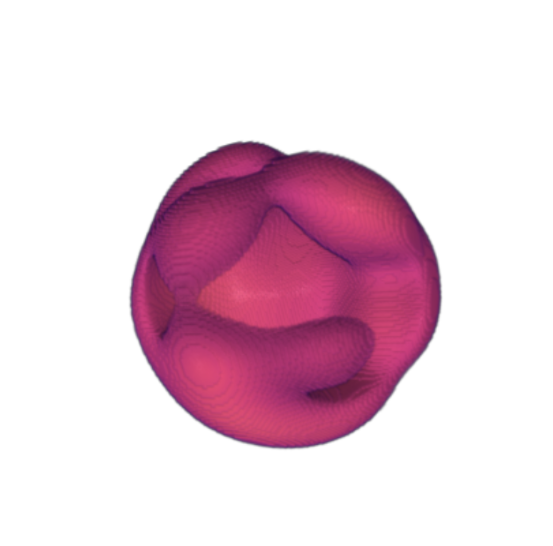
pygel3d_visualization_vol

# Convert the 3D numpy array to a mesh object
mesh = qim3d.mesh.from_volume(synthetic_blob, mesh_precision=0.5)

# Visualize the generated mesh
qim3d.viz.mesh(mesh)
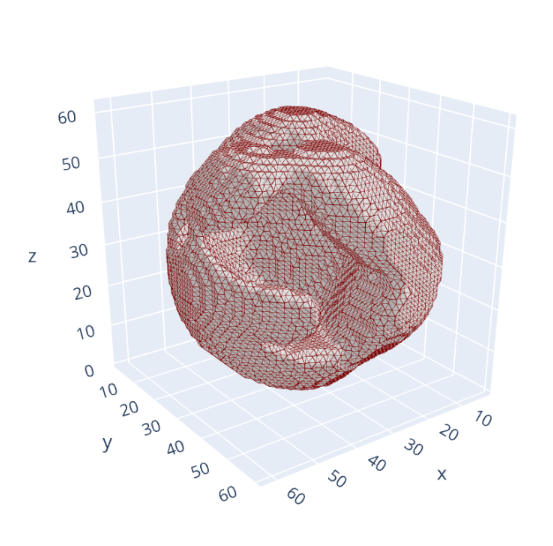
pygel3d_visualization_mesh

Source code in qim3d/mesh/_common_mesh_methods.py
def from_volume(
    volume: np.ndarray,
    mesh_precision: float = 1.0,
    backend: str = 'pyvista',
    method: str = 'marching_cubes',
    isovalue: float = 0.5,
    return_pygel3d: bool = False,
    **kwargs: any,
) -> SurfaceMesh | hmesh.Manifold:
    """
    Converts a 3D binary or grayscale volume into a polygon mesh (isosurface extraction).

    This function transforms voxel-based data into a vector-based surface representation (triangular mesh). This process, often called polygonization or tessellation, is a necessary step for 3D printing (exporting to STL), finite element analysis (FEA), or surface-based geometric measurements. The mesh can be generated using either PyVista or PyGEL3D. When using the PyGEL3D backend, it utilizes the [`volumetric_isocontour`](https://www2.compute.dtu.dk/projects/GEL/PyGEL/pygel3d/hmesh.html#volumetric_isocontour) function from PyGEL3D. It extracts the surface where the volume values equal `isovalue`.

    Args:
        volume (np.ndarray): A 3D numpy array representing a volume.
        mesh_precision (float, optional): Scaling factor for adjusting the resolution of the mesh.
                                        Default is 1.0 (no scaling).
        backend (str, optional): What python package is used to compute mesh from volume.
            It is either 'pyvista' or 'pygel'. Default is 'pyvista'
        method (str, optional): Only applies if `backend = pyvista`. What method is used to compute mesh from volume.
            It can be either 'marching_cubes' or 'flying_edges'. Default is 'marching_cubes'
        isovalue (float, optional): The scalar value at which to extract the isosurface.
            For binary volumes with values 0 and 1, the boundary is usually 0.5. Default is 0.5.
        return_pygel3d (bool, optional): If set to True, returns pygel3d.hmesh.Manifold. If False, returns qim3d.mesh.SurfaceMesh.
            Default is False.
        **kwargs: Additional arguments to pass to the PyGEL3D [`volumetric_isocontour`](https://www2.compute.dtu.dk/projects/GEL/PyGEL/pygel3d/hmesh.html#volumetric_isocontour) function.

    Raises:
        ValueError: If the input is not 3D, is empty, or if `mesh_precision` is outside the (0, 1] range.

    Returns:
        mesh (SurfaceMesh | hmesh.Manifold):
            The generated mesh object containing vertices and faces.

    Example:
        Convert a 3D numpy array to a mesh object:
        ```python
        import qim3d

        # Generate a 3D blob
        synthetic_blob = qim3d.generate.volume()

        # Visualize the generated blob
        qim3d.viz.volumetric(synthetic_blob)
        ```
        ![pygel3d_visualization_vol](../../assets/screenshots/viz-pygel_mesh_vol.png){width='300', length='200'}

        ```python
        # Convert the 3D numpy array to a mesh object
        mesh = qim3d.mesh.from_volume(synthetic_blob, mesh_precision=0.5)

        # Visualize the generated mesh
        qim3d.viz.mesh(mesh)
        ```
        ![pygel3d_visualization_mesh](../../assets/screenshots/viz-pygel_mesh.png){width='300', length='200'}

    """

    if volume.ndim != 3:
        msg = 'The input volume must be a 3D numpy array.'
        raise ValueError(msg)

    if volume.size == 0:
        msg = 'The input volume must not be empty.'
        raise ValueError(msg)

    if not (0 < mesh_precision <= 1):
        msg = 'The mesh precision must be between 0 and 1.'
        raise ValueError(msg)

    if backend not in ('pyvista', 'pygel'):
        msg = f"Backend has to be either 'pyvista' or 'pygel'. Yours is {backend}"
        raise ValueError(msg)

    if 'tau' in kwargs:
        msg = 'Use `isovalue` instead of passing `tau` through kwargs.'
        raise ValueError(msg)

    # Apply scaling to adjust mesh resolution
    volume = scipy.ndimage.zoom(volume, zoom=mesh_precision, order=0)

    if backend == 'pyvista':
        grid = pv.ImageData(dimensions=volume.shape)
        mesh = grid.contour(
            [isovalue],
            volume.flatten(order='F'),
            method=method,
        )
        if return_pygel3d:
            mesh = mesh.triangulate()
            faces = mesh.faces.reshape(-1, 4)[:, 1:]
            return hmesh.Manifold.from_triangles(np.asarray(mesh.points), faces)

    elif backend == 'pygel':
        mesh = hmesh.volumetric_isocontour(volume, tau=isovalue, **kwargs)
        if return_pygel3d:
            return mesh
        return SurfaceMesh.from_pygel(mesh)

    return SurfaceMesh(mesh)